Your Knowledge Is a Business — Treat It Like One
The creator economy has matured. Followers and views are a vanity metric. Revenue from your expertise—earned on your terms, through services you design—is the real number that matters.
Qynko Studio is built around a simple idea: your knowledge deserves infrastructure. Not a generic marketplace where you compete on price, but a dedicated platform that gives you AI tools, a public profile page, and four proven service formats to build a sustainable income from what you know.
Here's exactly how each format works and when to use it.
What is Qynko Studio and how does it help knowledge creators earn money?
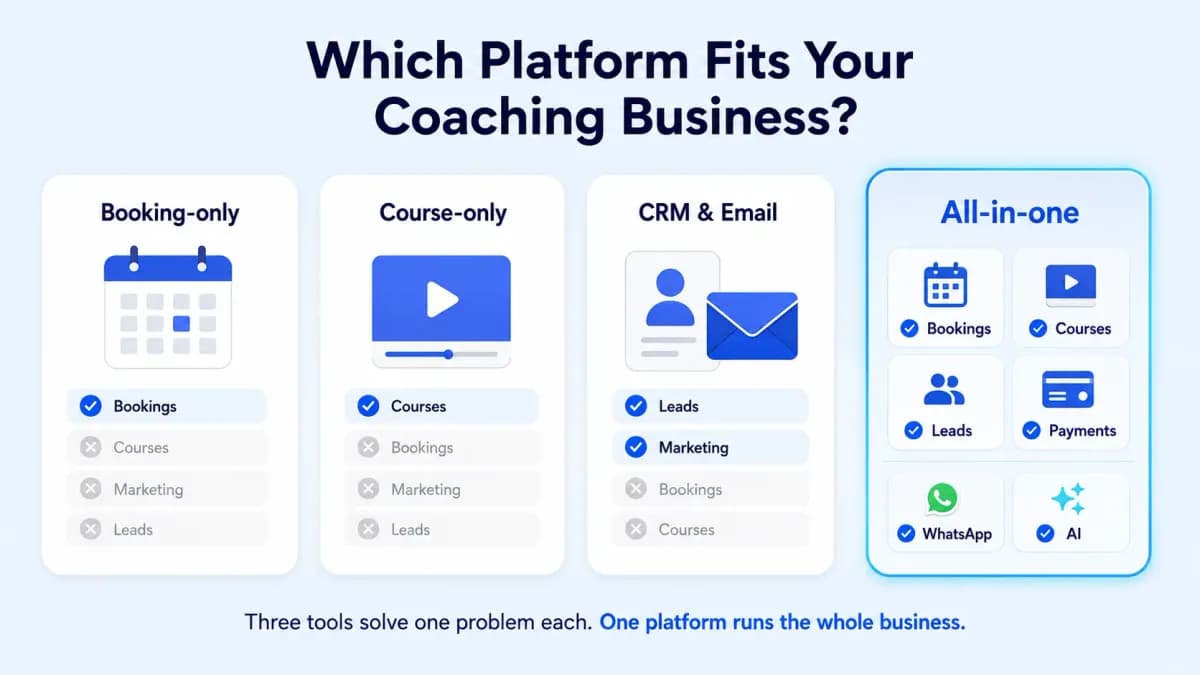
Qynko Studio is an AI-powered platform that gives Indian coaches, educators, and consultants everything they need to build and sell their expertise online — courses, 1:1 sessions, webinars, and paid communities — from a single dashboard. Unlike general marketplaces, Qynko Studio is dedicated creator infrastructure: you get your own public profile, INR pricing, Razorpay payments, AI tools to find what your audience wants, and full control over your pricing and audience.
What service types can I sell to monetize my knowledge on Qynko Studio?
Qynko Studio supports four service formats: 1:1 Sessions (individual video consultations), Courses (pre-recorded video curriculum), Webinars (live group sessions with registrations), and Paid Communities (subscription groups with monthly recurring revenue). Most successful creators use a combination — starting with 1:1 sessions to validate their expertise, then layering in courses and communities to scale their income without adding more of their time.
1. The 1:1 Session — Your Highest-Value Offering
A 1:1 session is a scheduled video call between you and a single client. You set your availability through the Settings → Availability page, define session durations and pricing, and clients book directly from your profile.
This is your highest-touch, highest-margin offering. Clients pay a premium for direct access to you. Use it for coaching, consulting, mentorship, or expert review sessions.
- Set availability by day and time window — clients can only book within hours you define
- Choose session duration (30 min, 60 min, custom)
- Video calls run directly inside the platform — no third-party links required
- Bookings appear in your Bookings dashboard with client details and session time
Best for: Coaches, consultants, therapists, financial advisors, career mentors.
How do 1:1 coaching sessions work on Qynko Studio?
You set your availability in Settings → Availability by defining your weekly schedule. Clients browse your public profile, select an open slot, and pay to confirm the booking. The session is conducted via Qynko Studio's in-platform video call — no separate Zoom or Google Meet link needed. All confirmed sessions appear in your Bookings dashboard, and the platform sends automatic reminders to both you and the client before the call.
What types of professionals is the 1:1 session format best suited for on Qynko Studio?
The 1:1 session format is ideal for professionals who provide personalised, advice-based services: executive coaches, career mentors, fitness coaches, financial advisors, therapists, legal consultants, chartered accountants, nutritionists, and subject-matter experts in any field where tailored guidance is the core value. If your expertise is most powerful when applied to an individual's specific situation, the 1:1 session is your highest-value service.
2. Video Courses — Earn While You Sleep
A course is a pre-recorded product. Build it once, sell it indefinitely. Students enroll, progress through lessons at their own pace, and you earn each time without additional time investment.
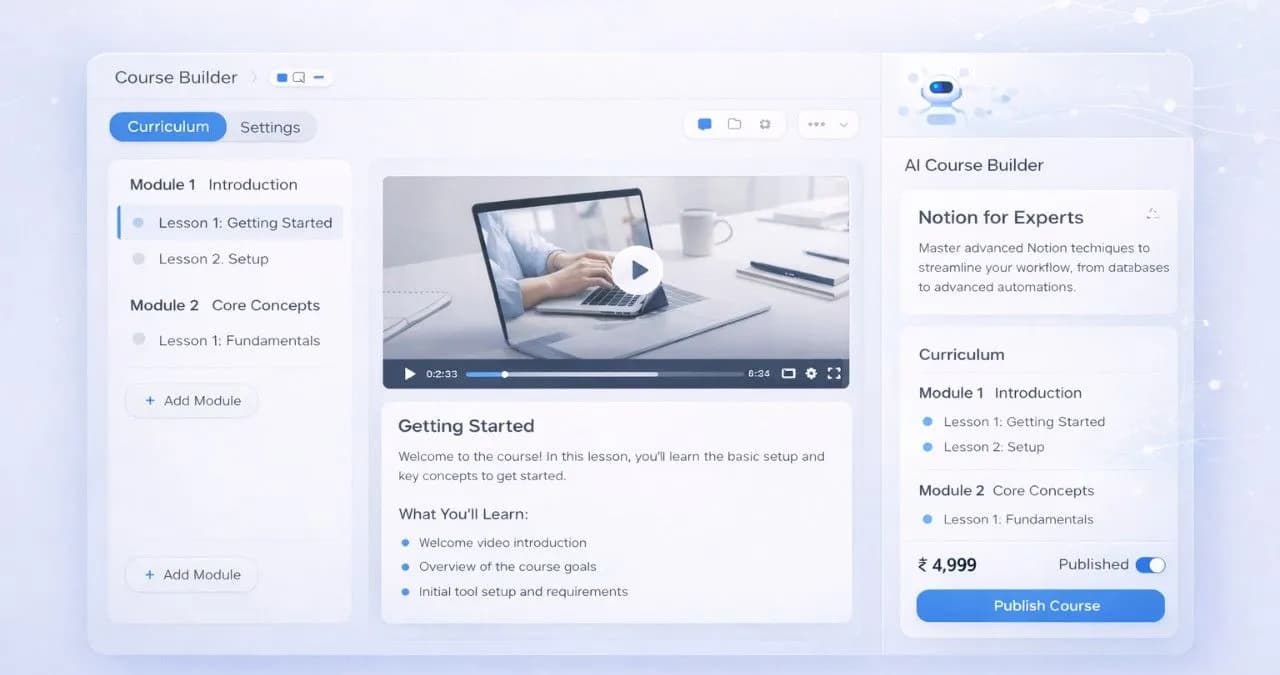
Qynko Studio's course builder supports video lessons, text content, and structured modules. The AI Service Builder generates your curriculum outline—so you spend time teaching, not planning.
Best for: Teachers, trainers, subject matter experts with deep domain knowledge to package.
How do I create a video course on Qynko Studio?
Go to My Store → Courses → Quick Create. You can build the curriculum using sections and lessons — each lesson supports video uploads, text content, and file attachments. Set a one-time price, publish the course to your profile, and share the link. The AI Service Builder can generate a full curriculum outline, title, and description from a single prompt if you want a starting structure before filling in the content.
Can I use Qynko Studio's AI to help me build my course curriculum?
Yes. The AI Service Builder on Qynko Studio generates a complete course curriculum outline — section names, lesson titles, a suggested course description, and a recommended price point — based on your course topic and target audience. It takes seconds and gives you a structured starting point so you can focus on recording the content rather than figuring out the architecture of your course.
3. Webinars & Live Events — Group Access at Scale
A webinar is a live group session: one instructor, many attendees, one scheduled time. Unlike a 1:1 session, a webinar earns a fixed revenue per attendee—and you can run it to hundreds of people at once.
Use webinars for workshops, masterclasses, Q&A events, or product launches. Attendees register and pay upfront; you run the session on the scheduled date.
- Set event date, time, and capacity
- Fixed price per attendee — revenue scales with registrations
- Attendee list visible in your Bookings dashboard before the event
- Replay option: record the session and make it available as a course asset
Best for: Educators, community builders, product experts, anyone with content that benefits from live interaction.
How do live webinars work on Qynko Studio?
A webinar on Qynko Studio is a live group session where you present to multiple attendees who register and pay in advance. You set the date, time, capacity, and price per attendee. Registrations and payments are collected automatically through your creator profile. The attendee list appears in your Bookings dashboard. After the webinar, you can repurpose the recording as a course asset or attach it as a course lesson.
How do I set the price and capacity for a webinar on Qynko Studio?
When creating a webinar in My Store, you define the fixed price per attendee and the maximum capacity. Revenue is determined by registrations: at ₹499 per attendee with 100 registrations, you earn ₹49,900 from a single 90-minute live session. Setting a capacity limit creates scarcity and urgency that can increase registration rates. You can offer the replay to registrants afterward or restrict access to live attendees only.
4. Paid Communities — Recurring Revenue Every Month
A paid community is a subscription-based group: members pay monthly for access to your private space, exclusive content, group chats, and direct interaction with you.
This is Qynko Studio's most powerful format for building recurring revenue. A community of 100 members paying ₹999/month generates ₹99,900 in predictable monthly income—without any additional sessions required.
Best for: Creators with an engaged audience, coaches who want group accountability structures, experts who share ongoing updates and resources.
5. Mix Formats for Maximum Revenue Per Follower
The most effective Qynko Studio creators don't pick one format—they stack them. A typical high-earning setup looks like this: a free-entry community to build trust → a paid course to deliver deep value → a 1:1 session upgrade for clients who want personal help.
This creates a natural progression: followers enter for free, convert to course buyers, and upgrade to 1:1 clients. Your revenue per follower compounds as they move up the ladder.
Use AI Market Insights to identify which format has the strongest demand signal in your subcategory before deciding where to invest your build time.
How do paid communities work on Qynko Studio and what recurring revenue can they generate?
A paid community on Qynko Studio is a subscription group where members pay a monthly fee for access to your ongoing content, guidance, and peer community. Members subscribe through your public profile and are charged monthly. At 100 members paying ₹999/month, that is ₹99,900 in predictable monthly recurring revenue — separate from any course or session income. The key to retention is delivering regular value: weekly posts, monthly live Q&As, or structured group accountability.
How do I combine multiple service formats on Qynko Studio to maximize my earnings?
The most effective approach is a service ladder: start with a free or low-cost community to build your audience and trust, offer a paid course for structured self-paced learning, and position 1:1 sessions as the premium tier for personalized guidance. Each layer monetizes a different segment of your audience at a different price point. AI Market Insights helps you identify which format has the highest demand in your subcategory at any given time, so you build the right next service — not just the next obvious one.
Getting Paid: The Payouts System
Every service type on Qynko Studio feeds into a single payout system. Revenue from sessions, course enrollments, webinar registrations, and community subscriptions accumulates in your account.
Navigate to Payouts in the sidebar to see your earnings breakdown by service type and request withdrawals. Qynko Studio transfers funds directly to your linked bank account.
No subscription fees, no hidden commissions on your earnings beyond the platform's standard transaction rate. Your revenue is yours.
How does the payout system work across all service types on Qynko Studio?
All revenue from courses, 1:1 sessions, webinars, and paid communities is consolidated in the Payouts module under your sidebar. You can filter earnings by service type and date range to see a breakdown. When you are ready to withdraw, initiate a transfer to your linked bank account directly from the platform — no invoicing, no third-party tool, no spreadsheets. Payments are processed through Razorpay with standard transfer timelines to your Indian bank account.